- Info:
-
Parallax's Propeller Home Page
-
Getting Started Tips
-
User Forum
-
Object Exchange (Free
software for Propeller 1 and 2)
-
My Programming Projects
-
The Propeller is exciting because one can easily:
-
Drive a VGA monitor (or NTSC/PAL video monitor) to display text utilizing built-in font or graphics
-
Generate complex sounds, even human speech
-
Take user input from PS/2 keyboard and mouse
-
Control I/O ports with 50-ns (20 MHz) precision (12.5 ns possible using internal counters)
-
Utilize multiple internal CPUs to control multiple, independent processes
-
Interface via RS232, I2C, SPI
-
Timing Pulse Generation (This is my initial interest regarding Propeller)
-
FAQ
- Details:
-
Manual
-
Datasheet
-
Propeller is a CMOS device running at 3.3 VDC.
-
Extra circuitry is sometimes required to interface to 5-V logic.
-
CPU can draw a maximum of 300 mA, dissipating only 1 W
-
Block Diagram:
-
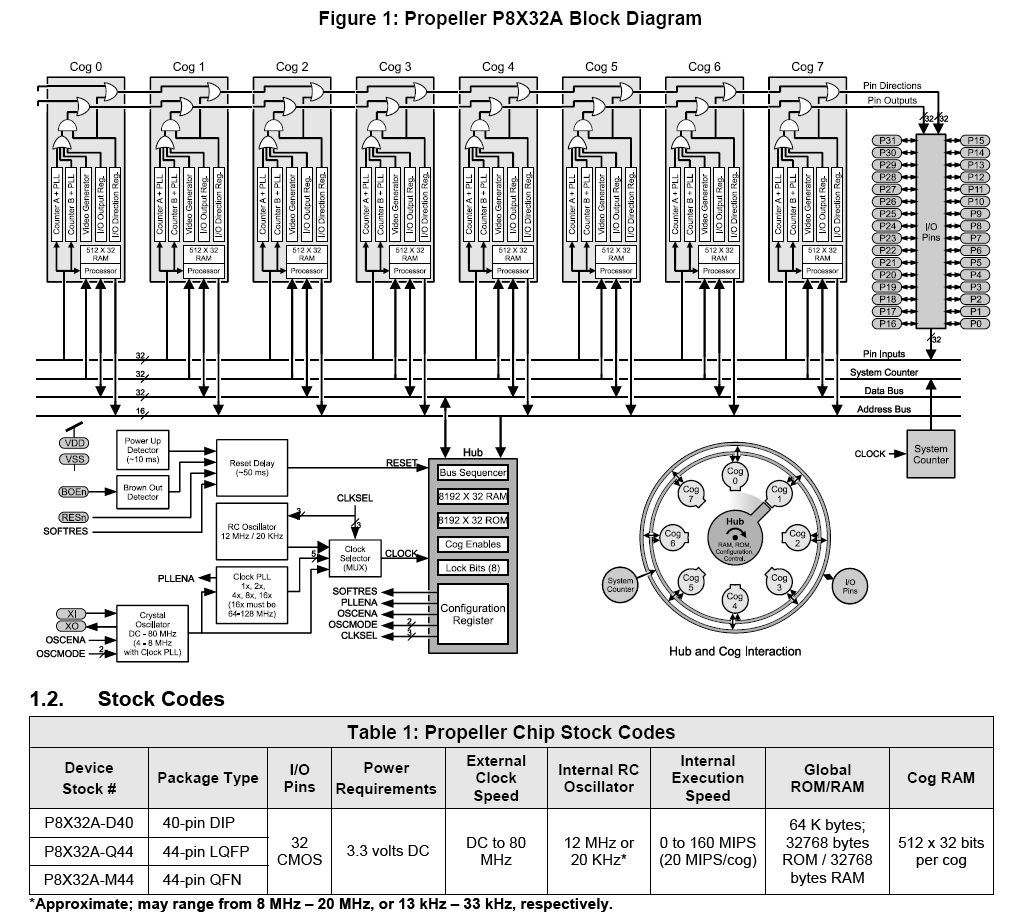
The Propeller is a microcontroller comprising 8 independent 32-bit processors, called "cogs"
-
Each cog can run at up to 80 MHz. (or 100 MHz with special 6.25 MHz crystal instead of the usual 5 MHz
-
All cogs share the same clock
-
An internal PLL allows easy operation at 80 MHz using an external 5-MHz crystal
-
Other, lower speed, outputs of the PLL are also selectable
-
There are also internal RC oscillators at 20 kHz and 12 MHz
-
The user's program decides what clock source to use, can be set either upon program load or programmatically while running
-
Nearly all cog CPU instructions require 4 clock cycles, giving 20-MIPS operation (per cog) at 80 MHz
-
Only instructions involving the hub take more clock cycles. The exact number of cycles is variable, depending on hub rotational position.
-
Each cog has 2 kB of full speed RAM (arranged as 512 longs)
-
Since all CPU operations work with 32-bit longs (rather than 8-bit bytes) and addresses are all words (16 bits), so it is often better to think in terms of words or longs rather than bytes for the Propeller assembly code (except for compact data)
-
Cogs also have access to the much larger Hub memory (see below)
-
Each cog has a hardware video generator and two special counters (CTRA and CTRB)
-
Both counters have 3 special registers (CTR, FRQ, PHS)
-
The basic function of the counter is to add the quantity in the FRQ register into the PHS register. When and how this is done is determined by the setting of the CTR register.
-
Counters can operate independently from cog CPU with clock rates (controlled by CTR, FRQ registers) from 500 kHz to 128 MHz. This done via a PLL and VCO controlled by bit PHS[31].
-
CTRA is used by the video generator, when the video generator is utilized
-
A "Hub" controls the cogs
-
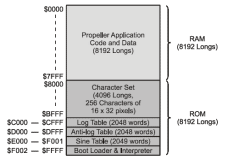
Hub has 32-kB RAM and 32-kB ROM
-
Hub controls and all cogs have access to a system counter that increments at the clock frequency
-
Cogs interface hub memory with 16-bit address bus and 32-bit data bus
-
Hub maintains "Locks", a special 8-bit register accessed by special instructions
-
Programs that wish to use multiple cogs that may interfere with each other by attempt to access the same resources simultaneously, may wish to use these locks to ensure that only one cog has access at any given time
-
All cogs share the same 32 I/O Pins, P0-P31 and 32 direction bits
-
Each cog has a 32 bit I/O output register and a 32-bit I/O direction register All 32 I/O outputs are OR'd together and all 32 I/O direction registers are OR'd together to determine actual settings
-
This seems to be a unique feature of the Propeller
-
If any cog's output is set to "1", the corresponding actual output will be a "1"
-
The actual output of a pin is "0" only if all corresponding cog outputs are "0"
-
If any cog's pin direction is "1", the corresponding actual pin direction with be "output"
-
A pin's direction is "input" only if all corresponding cog directions are "0"
-
I/O pins P0-P27 are general purpose, but pins P28-P31 are special
-
Pins P28-P29 are quasi-optional I2C connection (SCL, SDA) to external EEPROM
-
Pins P30-P31 are optional serial connection (TX, RX) to a controlling computer
- Boot Sequence:
-
1. Power or reset applied
-
2. After 50 ms, clock switches from 20 kHz RC to 12 MHz RC
-
3. Cog 0 loads and runs "Boot Loader" from hub ROM
-
4. Boot Loader checks for computer listening on serial port of I/O pins P30 and P31
-
If found, computer can either transfer a program to hub RAM and optionally to external EEPROM. If successful, jumps to step 7, otherwise continues to step 5.
-
Computer can also instruct Propeller to suspend operation.
-
5. Boot Loader checks for response from EEPROM with I/O pins P28 and P29.
-
If found, 32 kB is transferred from EEPROM to hub RAM. If successful, jumps to step 7
-
6. When no computer host found and no EEPROM found, cog 0 is stopped, all I/O pins set to input mode, and Propeller goes into shutdown mode
-
7. After successfully loading a program into hub RAM (and not instructed by computer to suspend):
-
Cog 0 loads and runs the "Spin Interpreter" code from hub ROM
-
Spin Interpreter executes code in hub RAM
- Programming Tools
-
The Propeller Tool is the official programming tool, check here for the latest and some other tools
-
Debugging can be a bit difficult. One easy way to do debugging is to use a Terminal window on the PC and the "FullDuplexSerial" object to send messages to the PC at places of interest in your code. The Prop Tool now comes with "Parallax Serial Terminal" which can be used for this purpose.
There is also a "pst" object that can be used instead of fullduplexserial
-
Catalina is a solid tool for ANSI C programmingget from here
-
FlexProp is a new tool for P1 (supports Spin, C, and Basic) download the latest "Release" here
-
SpinTools IDE is also a new tool for P1 (supports Spin, C) download from here